-1.jpg?width=93&height=26&name=trellis%20logo@2x%20(2)-1.jpg)
Researching motion outcomes by judge means looking at how often a judge grants a specific type of motion, comparing that rate to other judges in the same county and state, and checking how many rulings the numbers are based on. In Trellis, you can do this by asking Trellis Chat a plain-language question about your judge and motion type, then verifying the details in the judge's Judge Analytics dashboard.
This article walks through the process using Judge Daniel M. Crowley of Los Angeles County Superior Court as an example.
Step 1: Ask Trellis Chat how your judge rules on your motion
Open Chat from the top navigation and ask about your judge and motion type. (New to Chat? See What Is Trellis Chat?) Include the judge's full name and court so Chat finds the right judge, and ask for a comparison to the county and state.
Example prompt:
How does Judge Daniel M. Crowley (Los Angeles County Superior Court) rule on motions for summary judgment? Compare his grant rate to the county and state averages.
Chat returns the judge's grant, deny and partial-grant rates for that motion, side by side with the county and state averages. It also shows how many orders the numbers are based on.
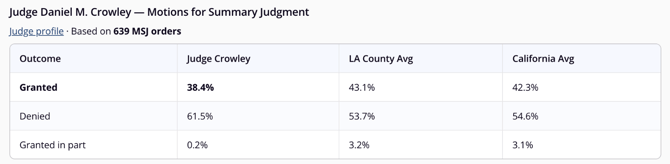
In this example, based on 639 summary judgment orders, Judge Crowley granted motions for summary judgment 38.4% of the time, compared with 43.1% across Los Angeles County and 42.3% statewide.
💡 Tip: Use the motion name your court uses. In California, for example, ask about demurrers rather than motions to dismiss.
Step 2: Compare the judge to the county and state
A grant rate on its own doesn't tell you much. The county and state averages show whether a judge is typical or an outlier for that motion type.
Using the summary judgment example:
| Outcome | Judge Crowley | LA County avg | California avg |
|---|---|---|---|
| Granted | 38.4% | 43.1% | 42.3% |
| Denied | 61.5% | 53.7% | 54.6% |
| Granted in part | 0.2% | 3.2% | 3.1% |
A few things stand out:
- His grant rate is about 5 percentage points below the county average.
- He rarely grants summary judgment in part (0.2% vs. about 3% countywide).
- The rate is similar regardless of who files. He granted 40% of plaintiff-filed motions and 37% of defendant-filed motions.
You can also ask Chat to break the numbers down by moving party: "Does Judge Crowley's MSJ grant rate differ when the plaintiff or defendant is the moving party?"
Step 3: Check how many orders the numbers are based on
The number of orders behind a grant rate tells you how much weight to give it. A rate based on hundreds of orders is more reliable than one based on a few dozen.
Ask Chat to include order counts, especially when comparing several motion types:
How does Judge Crowley rule on motions to compel discovery and demurrers? Compare each to the county and state averages and show how many orders each is based on.
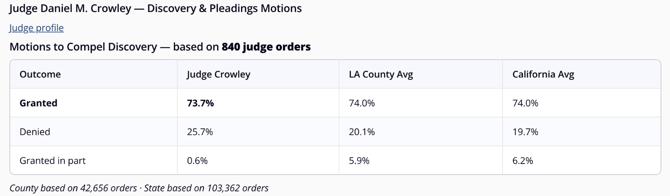
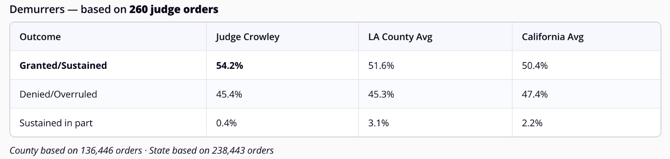
Judge Crowley’s motion to compel discovery grant rate (73.7%, based on 840 orders) matches the county and state averages of 74.0%. His demurrer grant rate (54.2%, based on 260 orders) is slightly above the county average of 51.6% and the state average of 50.4%.
Both rates are based on a substantial number of orders, and both are close to the county average. That's useful to know too. Not every judge is an outlier on every motion, and knowing where a judge is typical helps you focus your preparation where it matters.
Step 4: Check timing
How long a judge takes to move cases forward affects scheduling, budgeting and client expectations. Ask Chat for timing benchmarks:
How long do cases take to reach trial before Judge Crowley, compared to the county and state?
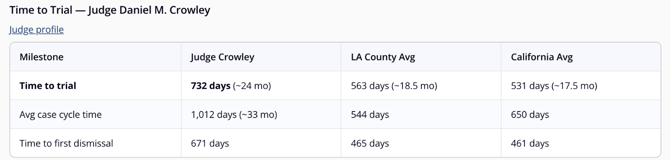
In this example, cases before Judge Crowley take 732 days to reach trial, compared with 563 days across Los Angeles County and 531 days statewide. His average case cycle time is 1,012 days (county average: 544), and time to first dismissal is 671 days (county average: 465).
Step 5: Verify and explore in the Judge Analytics dashboard
Each Chat response includes a Judge profile link that opens the judge's Judge Analytics dashboard on the Bio tab. Click Motions or Case Milestones to verify the numbers from Chat. You can also get to the dashboard from Insights > Judge Analytics by selecting the state and filtering by judge name.
The dashboard has five tabs:
- Bio: background, appointment, education, department and courtroom information
- At a Glance: active cases, average case length, overall motion grant rate and practice area mix
- Motions: grant, deny and partial rates for every motion type with enough data. Use Filter by Motion to search for a specific motion.
- Outcomes: how cases before the judge are resolved
- Case Milestones: time to trial, average case duration and time to dismissal, which you can filter by practice area
Use the dashboard to check the numbers from Chat and to browse motion types you didn't ask about. The Last updated date at the top shows how current the data is.
Learn more: Contents of Each Judge Analytics Tab
Step 6: Save and share your research
- From Chat: Use Export PDF to save the conversation, or Share to send it to a colleague. Use Save Prompt to reuse a question for other judges.
- From the dashboard: Use Generate Report to create a PDF of the judge's analytics. See Downloading, Printing, or Sharing a Report of the Judge Analytics Dashboard.
- Stay current: Click Track Judge's New Cases on the judge's Bio tab to get notified when new cases are filed before the judge. See How to Set an Alert to Track When a New Case Involving a Specific Judge Is Filed.
Go deeper: read the judge's rulings
Grant rates show how often a judge rules a certain way. Rulings show why. To see a judge's reasoning, ask Trellis Chat for the judge's rulings on your motion type, or use the Helpful Searches on the judge's Bio tab, such as judge:"daniel m. crowley" AND "summary judgment", to search in Smart Search. See Researching Your Judge on Smart Search and Researching Motions Filed in State Court and/or Finding Motion Templates on Smart Search.
For a deeper look at how to move from a grant rate to the reasoning behind it, see No Assembly Required: Prompting Strategies for Judicial Research on the Trellis blog.
Frequently asked questions
How do I research how a judge rules on a specific motion? Ask Trellis Chat a question that includes the judge's full name, court and motion type, and ask for a comparison to the county and state averages. Then open the judge's Judge Analytics dashboard to verify the numbers and explore other motion types.
How many rulings do I need for a judge's grant rate to be meaningful? There's no single cutoff, but more orders mean a more reliable rate. Give more weight to rates based on hundreds of orders than to rates based on a few dozen, and ask Chat to show the order count.
Why don't I see my motion type on the judge's Motions tab? Trellis only displays motion metrics when there's enough data to be meaningful. If a motion type isn't listed, there aren't yet enough orders from that judge for that motion. New data is added regularly.
What's the difference between the judge, county and state averages? The judge figure reflects that judge's own orders. The county and state averages reflect orders from all judges in that county or state for the same motion type. Comparing them shows whether the judge is typical or an outlier.
Can I research judges outside California? Yes. Judge Analytics covers state trial court judges in many states. Check Coverage for availability in your jurisdiction.
How do I see the judge's reasoning, not just the statistics? Ask Trellis Chat for the judge's rulings on your motion type, or search the judge's rulings in Smart Search.
Does a judge's grant rate predict how my motion will be decided? No. Grant rates reflect how a judge has ruled in past cases. Every motion depends on its own facts, law and briefing. Use historical rates as context for preparation, not as a prediction.
How often is judge analytics data updated? Trellis adds new data regularly. Each judge's dashboard shows a Last updated date at the top.
Learn more
- How to Access Judge Analytics on Trellis
- Contents of Each Judge Analytics Tab
- Researching Your Judge on Smart Search
- How to Research a Judge Using the Trellis Connector
- How to Research Opposing Counsel's Litigation Patterns
- Motions & Issues Directory
- Judge Analytics
- The First 15 Minutes: Why Early Case Research Changes Everything (Trellis Blog)
Data note: Figures reflect Trellis data for Judge Daniel M. Crowley, Los Angeles County Superior Court, as of October 16, 2026. They are provided for research purposes and don't predict the outcome of any specific motion.